
Top Best Tools for Discord ID Lookup Tested with Midjourney Bot

Most articles about discord id lookup tools just list features without showing how they actually work.
So I tested the top tools myself using a real Discord ID — the Midjourney Bot (936929561302675456) — and documented exactly what each tool returned.
This way, you’re not guessing. You’ll know exactly what to expect from each tool.
What is a Discord ID Lookup?
A discord id lookup tool lets you input a Discord Snowflake ID and extract public metadata like:
- Username and discriminator
- Account creation date
- Bot/user status
- Avatar and badges
- Technical metadata
These tools are widely used for moderation, bot development, and verification workflows.
Uses of Discord ID Lookup
A discord id lookup tool isn’t just for curiosity—it plays a practical role across moderation, development, and community operations. Here are the most valuable use cases:
User Verification
Quickly validate a user’s identity when reviewing reports or handling suspicious activity within your server.
Account Age Analysis
Understand how old an account is by decoding its Snowflake ID—useful for spotting newly created or potentially risky accounts.
Moderation Support
Access key public attributes instantly to make faster, more informed moderation decisions.
Developer Debugging
Verify user IDs and inspect returned metadata when troubleshooting bots, integrations, or API-related issues.
Community Management
Get immediate context about users interacting with your server, bots, or automated workflows.
Educational Insight
Explore how Discord Snowflake IDs work, including how timestamps and metadata are encoded within them.
How to Find a Discord ID
Before using any discord id lookup tool, you first need the Discord ID itself.
Quick Steps:
- Open Discord
- Go to User Settings → Advanced
- Enable Developer Mode
- Right-click on a user, server, or message
- Click “Copy ID”
That’s it—the ID (a long numeric string) will be copied to your clipboard.
Need Detailed Steps?
For a more detailed walkthrough (including mobile instructions), refer to the official Discord guide:
1. VaultCord Discord ID Lookup (Most Visual + Detailed)
VaultCord gave the most complete and polished output during testing.
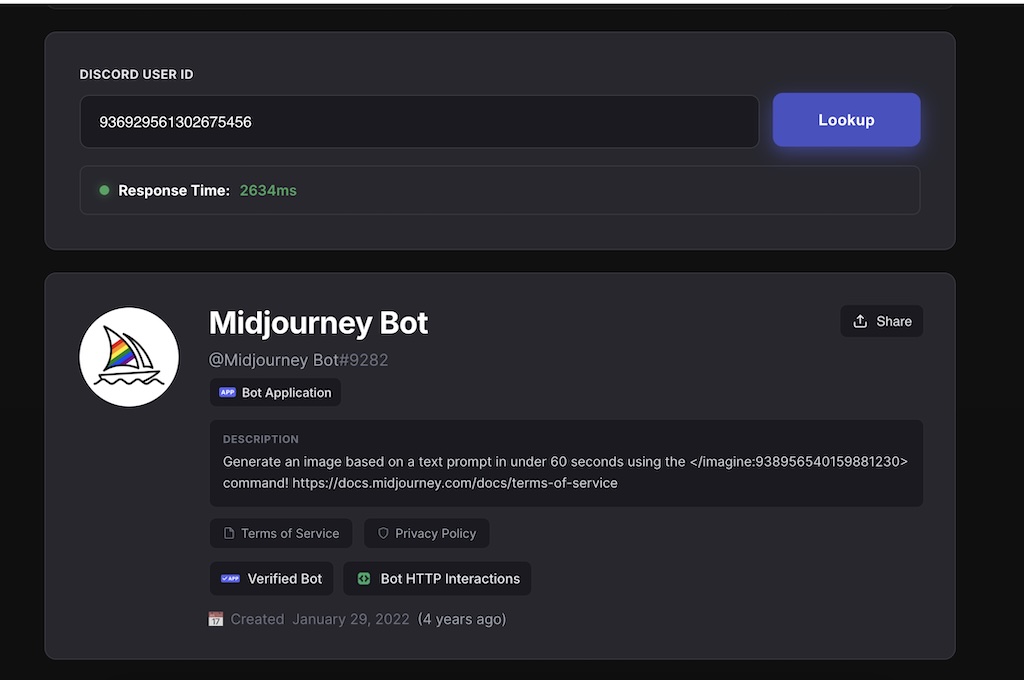
What I Found:
- Name: Midjourney Bot
- Handle: @Midjourney Bot#9282
- Type: Bot Application
- Verified Bot badge
- Bot HTTP Interactions enabled
- Description: Includes actual usage (e.g.,
/imaginecommand)
Created on: January 29, 2022
Response time: ~2634 ms
What Makes It Different:
VaultCord renders a full profile-style interface, not just raw data.
It also includes:
- Terms of Service
- Privacy Policy
- Functional bot metadata
Verdict:
Best for:
- Server owners
- Moderators
- Security-focused communities
2. NicheProwler Discord ID Lookup (Clean + Data-Focused)
NicheProwler provides a more structured and API-style output.
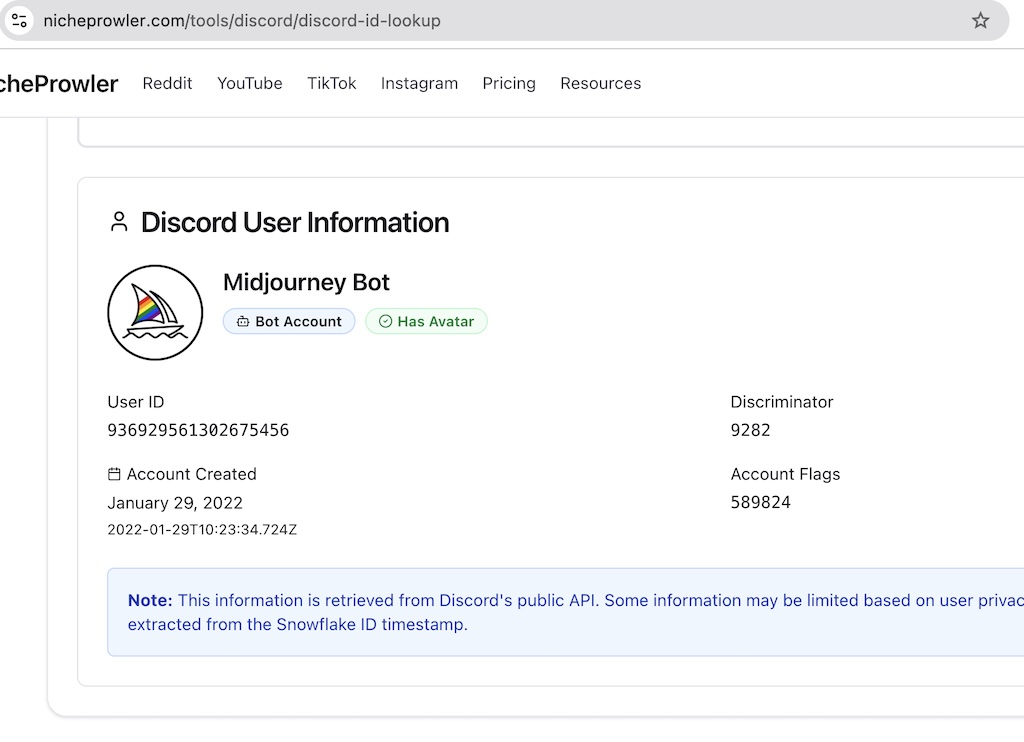
What I Found:
- Name: Midjourney Bot
Account Type: Bot Account
User ID: 936929561302675456
Discriminator: 9282
Account Created: January 29, 2022
Exact timestamp: 2022-01-29T10:23:34.724Z
Account Flags: 589824
Avatar: Present
What Stands Out:
- Precise timestamp in ISO format
- Account flags exposed numerically
- Clear note about Discord API data source
- Snowflake-based timestamp decoding
Verdict:
Best for:
- Developers
- Technical moderation
- Backend debugging
3. Discorder.tools Discord ID Lookup (Deep Technical Breakdown)
Discorder.tools provides the most transparent and low-level view of the data.
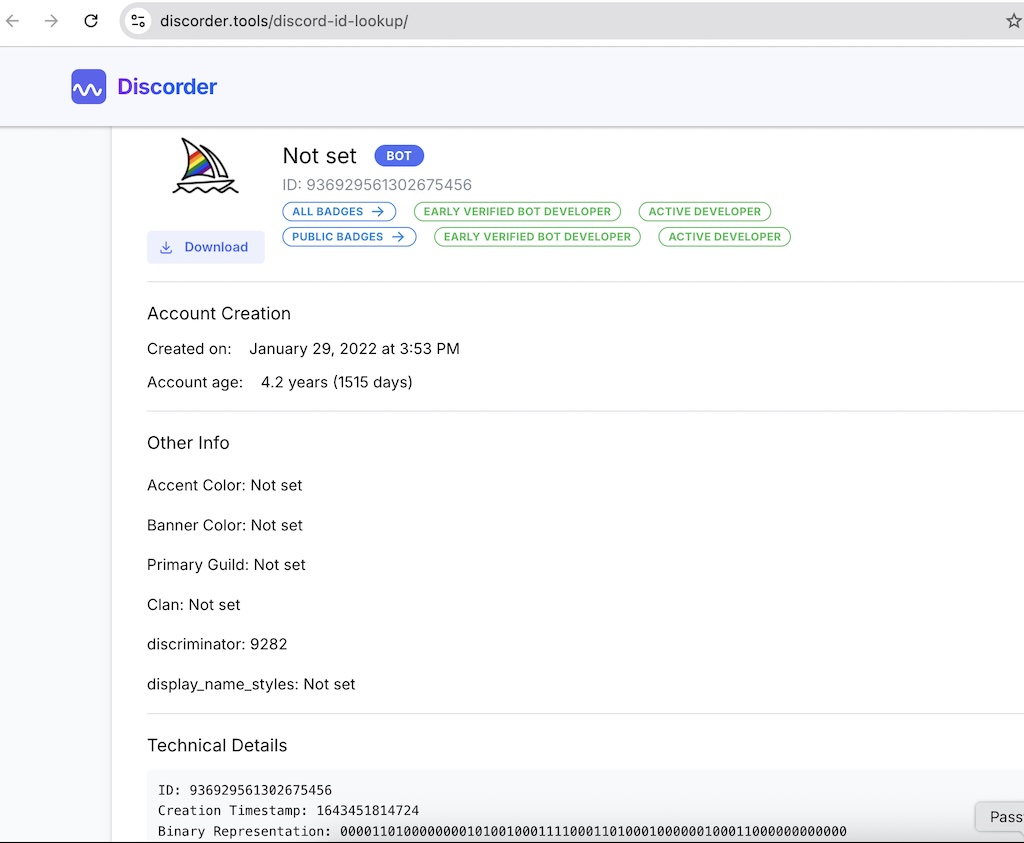
What I Found:
Basic Info:
- Name: Not set
- Type: BOT
- ID: 936929561302675456
Badges:
- Early Verified Bot Developer
- Active Developer
Account Creation:
- Created on: January 29, 2022 at 3:53 PM
- Account age: 4.2 years (1515 days)
Other Info:
- Accent Color: Not set
- Banner Color: Not set
- Primary Guild: Not set
- Clan: Not set
- Discriminator: 9282
Technical Details:
- Creation Timestamp: 1643451814724
- Binary representation of ID
What Makes It Unique:
- Shows both human-readable + machine-level data
- Includes binary breakdown of the Snowflake ID
Verdict:
Best for:
- Advanced users
- Developers
- Deep technical analysis
4. Discord.id (Important Limitation)
When I tested Discord.id, it didn’t return results directly.
Instead, it showed:
“Set a valid Discord bot token before running lookups.”
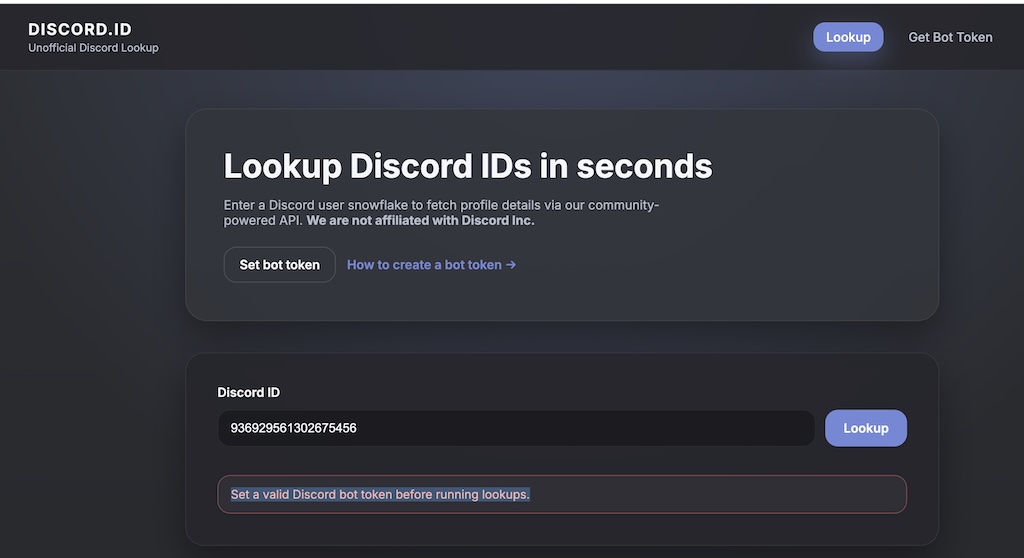
What This Means:
- Requires a Discord bot token
- Needs API-level setup
- Not usable instantly
Verdict:
- ❌ Not beginner-friendly
- ❌ Not suitable for quick lookup
- ✅ Only useful for developers with bot access
Real Comparison Based on Testing
| Tool | Ease of Use | Depth | What You Actually Get |
|---|---|---|---|
| VaultCord | Medium | Very High | Full profile + metadata |
| NicheProwler | Medium | High | Structured API data |
| Discorder.tools | Easy | Very High | Raw + decoded + binary data |
| Discord.id | Hard | High | Requires bot token |
Final Thoughts
If you're using a discord id lookup tool, the biggest difference isn’t the data— it’s how usable that data is.
- Use VaultCord for the most complete experience
- Use Discorder.tools for deep technical insights
- Use NicheProwler for structured data
- Avoid Discord.id unless you’re a developer
This test with the Midjourney Bot ID shows exactly how these tools behave in real-world usage—so you can choose based on your actual needs, not assumptions.