
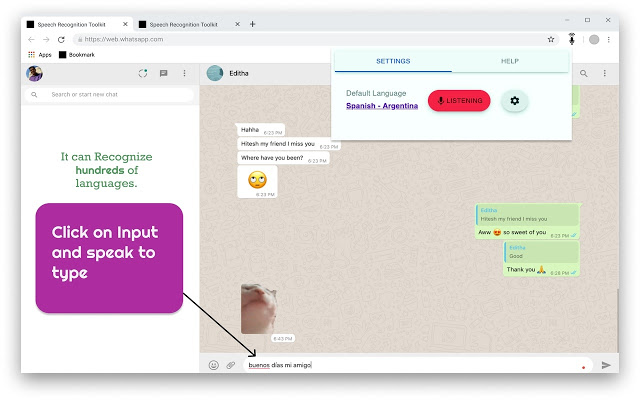
Fill out any web form by using only your voice! Just select the Input field and Dictate your voice.! An easy to use speech synthesis and recognition tool for your browser! Speech Recognition Toolkit is an extension that helps you convert your speech to text and fill out forms on the websites and speak recognized text if you want. It can recognize a wide variety of languages. In order to work with this extension, simply open the addon's UI and then press on the big microphone icon to start converting your voice to text. Please note that, when the add-on is first started, it asks for microphone permission. Please accept the permission to start working with the add-on. Works on google docs, google spreadsheets, fb messenger, instagram chats, Gmail or write blog posts on Wordpress or send messages in Slack and in any site that contains a text box. Greatest feature of all, is that it works on all the websites. :) Features: - Type with your voice on any website in more than 100 languages. - Supports On Start Feature. - TTS (Text to Speech) and copy on single click for recognized text. - Comes with voices commands such as * emoji - to search from more then 1800 emoji in your language to type a emoji with your voice. * Commands such as undo, redo, newline, press enter, calculate, math symbol etc. - Dictate Calculations on the fly. eg. to dictate result of ' 2 x 30' just say 'calculate 2 x 30' and it will dictate the result in the selected text box. - To insert math symbol, just say 'math symbol symbol_name' eg. 'math symbol sigma' to insert sigma symbol. more than 125 maths symbol available. - Supports always listen mode. - Free to use ### Full List of available commands `emoji` : say 'emoji emoji_name' to insert emoji with your voice from list of 1800 emojis. `undo`: say 'undo' to undo anything on page. `redo`: say 'redo' to redo anything on page. `new line`: say 'newline' to insert new line at the current curosor position. `Press Enter`: say 'Press enter' to press enter (for form submission purposes) `calculate`: say calculate 'expression' to calculate to math. eg. 'calculate five times fifteen' to calculate 5*15 `math symbol`: say 'math symbol square root' to type √a (math symbol). checkout whole list of symbols from link given on homepage. `Mindfulness`: Say 'mindfulness' to insert a random mindfulness thought in the text box. `scroll down`: Say 'scroll down' to scroll up the current page. `scroll up`: Say 'scroll up' to scroll up the current page. If you feel any issue, please write to fxnoob71@gmail.com.



