
A Practical AI Workflow for Turning One Product Image into a Finished Video
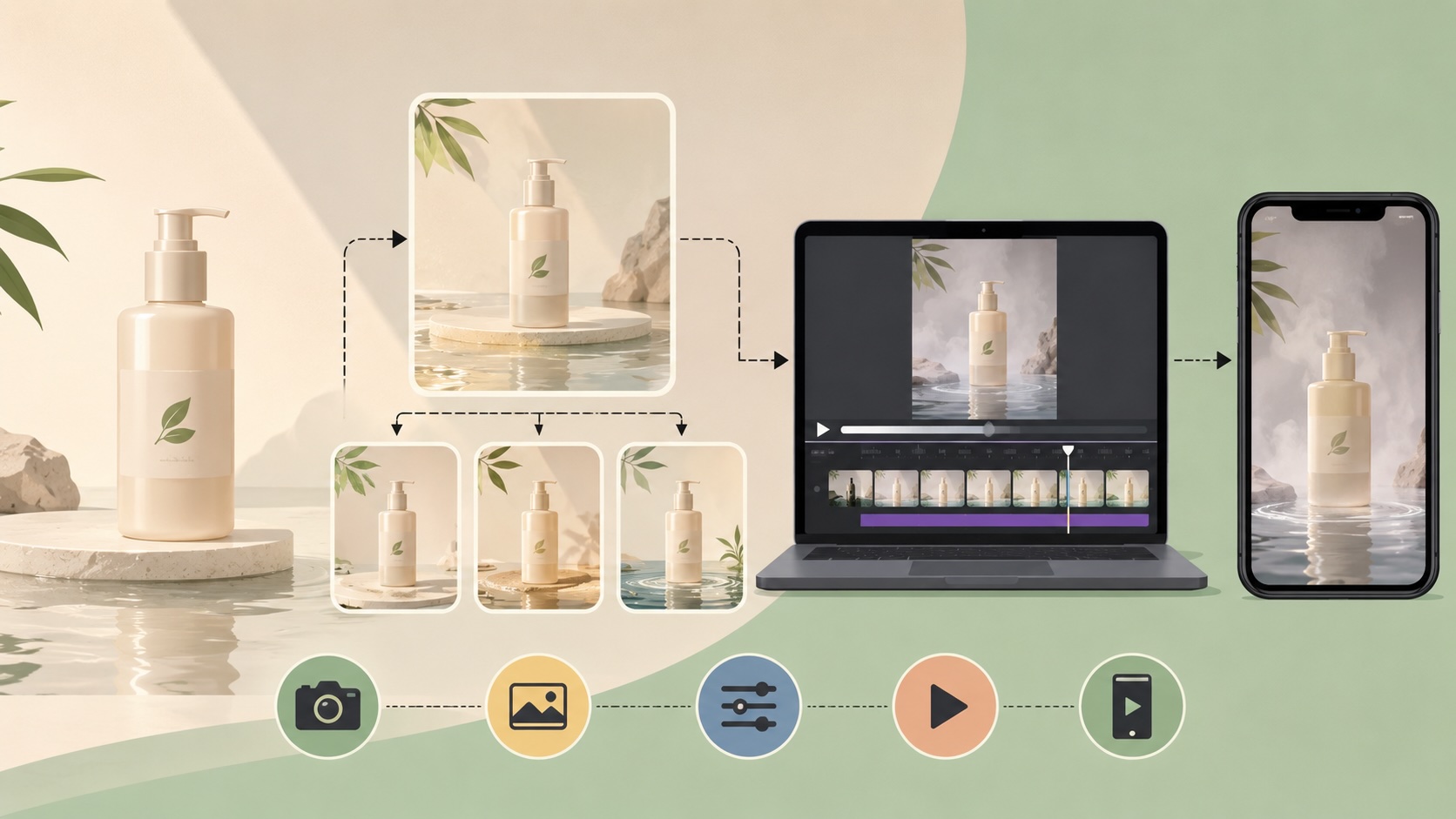
A 15-second product ad sounds simple until the bottle changes shape between frames, the label becomes unreadable, or the camera move looks wrong after an expensive render. Most of that waste starts before video generation. The team has not yet agreed on the product frame, the motion, or the conditions that make a result usable.
This article uses a skincare bottle as a worked example. The deliverables are a 4:5 campaign image, a 9:16 social version, and a 15-second vertical video. The same production method applies to cosmetics, packaged food, electronics, shoes, and other products whose shape and branding must survive every edit.
Lock the product before exploring the scene
A controlled AI workflow begins with a clean packshot at the highest available resolution. Decide what the model may change and what it must preserve. For this example, the bottle shape, cap, logo, label text, and proportions are locked. The background, lighting, surface, and small props may change.
The first image prompt can be short and strict:
Use the uploaded bottle as the only product reference. Preserve its exact proportions, cap geometry, logo, label wording, and colors. Place it on pale limestone with soft backlighting and a restrained water reflection. Compose in 4:5 with roughly 30 percent clear space on the upper left for campaign copy. Do not add text or redesign the package.
Review every output at full size. Reject it if the label cannot be read, the cap changes, the bottle leans without being asked, or the empty area is too busy for copy. These checks take less than a minute and prevent a flawed image from becoming the source for several flawed videos.
Once one composition passes, create the 9:16 version from that approved image. Regenerating the vertical frame from the original prompt introduces another chance for the product to drift.
Run the same brief through three image models
There is no useful universal ranking for image models. The right choice depends on the next edit.
Seedream 5 Pro is a strong candidate when the art direction uses several references, such as a packshot, a lighting reference, and a material reference. It also offers direct control over aspect ratio and 1K or 2K output. Nano Banana 2 is built for fast generation and editing while preserving subjects, which makes it useful for trying backgrounds or layout variations. GPT Image 2 supports high-fidelity image inputs, flexible sizes, and image editing, so it is worth testing when the label, typography, or a precise local change matters most.
Give each candidate the same packshot, prompt, aspect ratio, and rejection rules. Generate two results per model, then compare only four things: product shape, label accuracy, composition, and how much correction remains. Six controlled images reveal more than dozens of unrelated prompts.
Model catalogs change quickly. PitchWall's artificial intelligence collection is useful for discovering new tools, but production decisions should come from a controlled test with the actual product asset.
Use Fast or Mini to settle the motion
The approved still now becomes the first frame. A rough video prompt should describe observable movement rather than mood words:
15-second 9:16 product shot. Keep the bottle completely stationary and the label sharp. Use a slow five-percent camera push-in. Move the mist behind the bottle from right to left. Keep the water reflection subtle. No camera roll, no package deformation, and no new text. End on a clean frame suitable for a poster.
Start with Seedance 2 Mini when the team is still comparing broad options: push-in versus orbit, mist versus liquid, or a calm versus energetic pace. Use Seedance 2 Fast when the direction is narrower and the team needs a quicker preview that is closer to the intended timing. Watch the rough clips at normal speed and without sound first. A dramatic soundtrack can hide weak motion.
Seedance 2.0 accepts image, video, audio, and text references and is designed for more complex motion and audio-video generation. Move to the full model after the framing, motion path, effect intensity, and duration have passed review. Reuse the approved frame and prompt. Changing both the creative direction and the model at the same time makes the final result harder to diagnose.
Calculate the cost per attempt
Subscription totals are difficult to compare because creators rarely use every model equally. Unit cost is more useful.
Using the public rates on Fxroom at the time of writing, the base credit rate works out to about one cent per credit. Before volume discounts, popular models start at approximately:
- $0.04 for one GPT Image 2 or Nano Banana 2 image
- $0.04 for a 1K Seedream 5 Pro image, or $0.08 at 2K
- $0.09 per second for Seedance 2 Mini
- $0.12 per second for Seedance 2 Fast
- $0.15 per second for Seedance 2
Resolution, duration, and model settings can change the final charge, so check the displayed credit estimate before generating.
Now apply those rates to the skincare example. Two drafts from each of the three image models cost about $0.24 at the base settings. Three 15-second Seedance 2 Mini samples cost about $4.05. A 15-second final render with Seedance 2 costs about $2.25. The complete decision process comes to roughly $6.54 before optional upscaling or extra variations.
Running every motion draft on the full Seedance 2 model would bring the same example to about $9.24. The difference for one ad is $2.70. Across 100 similar production cycles, the sample-first method keeps roughly $270 available for final renders, alternative hooks, or higher-resolution images. More importantly, the expensive run begins with an approved motion plan.
One shared credit balance also makes model testing easier. The team can compare three image models, rough out motion, and produce the final video without maintaining a separate subscription and unused balance for every model family.
Save the approved setup, not just the prompt
After delivery, save the source packshot, locked product details, image prompt, chosen image model, approved master frame, video prompt, sample model, final model, duration, aspect ratio, and rejection notes together. That bundle is the useful template.
For the next product, the team can replace the packshot, background direction, and campaign copy while keeping the same review gates. This AI workflow preserves the decisions that stopped product drift and prevented full-price video renders from being used as experiments.